快速开始
juhe-cli 和 juhe-sync 的下载安装与快速上手
juhe-cli 是聚合聊天平台的命令行工具,提供企微/个微协议管理、SKILL 系统等能力。 juhe-sync 是配套的数据同步服务,提供消息存储和 HTTP API 查询。
前置条件
准备一台 Linux / macOS / Windows 服务器。如需 SKILL 部署,还需安装 Claude Code 或 OpenClaw。
内测阶段
开放平台目前处于内测阶段,接口和文档可能会有调整。如有问题请通过首页联系方式反馈。
架构概览
juhebot 平台由以下核心组件构成:
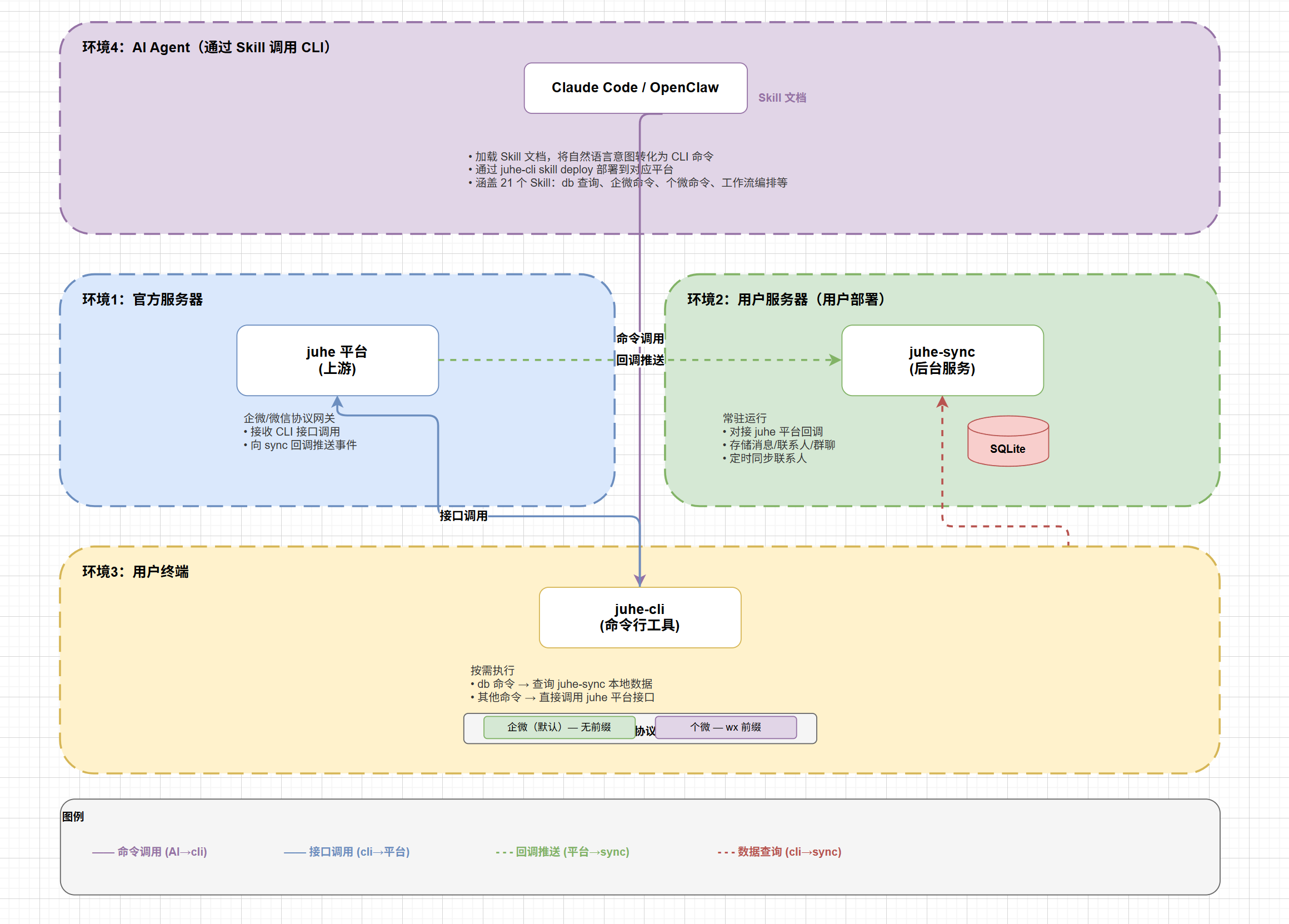
- AI Agent(Claude Code / OpenClaw):通过 SKILL 文件学习 juhe-cli 命令,实现自然语言交互
- juhe-cli:命令行工具,提供企微/个微协议管理能力
- juhe-sync:数据同步服务,接收回调消息并提供 HTTP API 查询
- juhebot 平台:云端 API 服务,管理设备和协议连接
下载 juhe-cli
Linux
bash
curl -L -o juhe-cli https://github.com/Hanson/juhe-cli/releases/download/v1.0.0/juhe-cli-linux-amd64
chmod +x juhe-cli
sudo mv juhe-cli /usr/local/bin/
macOS
bash
# Apple Silicon (M1/M2/M3)
curl -L -o juhe-cli https://github.com/Hanson/juhe-cli/releases/download/v1.0.0/juhe-cli-darwin-arm64

# Intel
curl -L -o juhe-cli https://github.com/Hanson/juhe-cli/releases/download/v1.0.0/juhe-cli-darwin-amd64

chmod +x juhe-cli
sudo mv juhe-cli /usr/local/bin/
Windows
从 GitHub Releases 获取 juhe-cli-windows-amd64.exe。
下载 juhe-sync
juhe-sync 是数据同步服务,接收回调消息并提供 HTTP API 查询能力:
Linux
bash
curl -L -o juhe-sync https://github.com/Hanson/juhe-cli/releases/download/v1.0.0/juhe-sync-linux-amd64
chmod +x juhe-sync
sudo mv juhe-sync /usr/local/bin/
macOS
bash
# Apple Silicon
curl -L -o juhe-sync https://github.com/Hanson/juhe-cli/releases/download/v1.0.0/juhe-sync-darwin-arm64

# Intel
curl -L -o juhe-sync https://github.com/Hanson/juhe-cli/releases/download/v1.0.0/juhe-sync-darwin-amd64

chmod +x juhe-sync
sudo mv juhe-sync /usr/local/bin/
Windows
从 GitHub Releases 获取 juhe-sync-windows-amd64.exe。
初始化配置
juhe-cli 初始化
运行交互式初始化命令,配置 API 连接信息:
bash
juhe-cli init初始化过程中需要输入:
- API URL:聚合聊天平台 API 地址
- App Key:应用密钥
- App Secret:应用秘钥
配置文件位置
配置文件默认保存在
~/.config/juhe-cli/config.json,也可通过环境变量覆盖。juhe-sync 初始化
准备配置文件 juhe-sync.json:
json
{
  "port": 8070,
  "api_url": "https://chat-api.juhebot.com",
  "app_key": "your_app_key",
  "app_secret": "your_app_secret"
}
启动服务:
bash
./juhe-sync run --config juhe-sync.json存储可选 MySQL
验证安装
bash
# 验证 juhe-cli
juhe-cli --version
juhe-cli device list

# 验证 juhe-sync
curl http://localhost:8070/api/sync-status?guid=your_guid
下一步
- 查看 安装配置 了解环境变量和配置优先级
- 查看 SKILL 部署 了解如何集成 AI Agent
- 查看 juhe-sync 部署 了解详细部署方式